
Download ZeFit2 APK – fitness tracker, activity monitor, sleep tracker, heart rate monitor, Bluetooth sync, notification sync, goal setting, daily activity, smartwatch app, mobile app
Overview
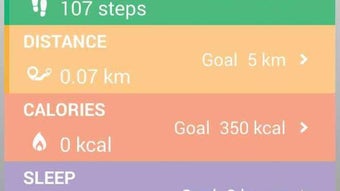
ZeFit2 is a lifestyle-focused mobile application developed by MyKronoz for Android devices. Designed to complement the MyKronoz ZeFit² and ZeFit² Pulse wearable devices, the app serves as a central hub for fitness tracking, daily activity monitoring, and real-time notification management. Its primary purpose is to help users maintain an active lifestyle while staying connected throughout the day. By syncing via Bluetooth 4.0, ZeFit2 enables seamless data transfer between the wearable and smartphone, allowing users to track steps, distance, calories burned, and sleep quality in real time.
The app is tailored for individuals seeking a holistic approach to health and connectivity, particularly those who rely on smartwatches or fitness trackers for daily insights. It supports goal setting and reminder features, helping users establish consistent routines. Real-world usage scenarios include monitoring morning workouts, tracking sleep patterns for better rest, and receiving instant notifications for calls, messages, emails, and calendar events directly on the wrist. While the developer did not provide additional details about advanced analytics or integration with third-party platforms, the app appears optimized for users who value simplicity, style, and consistent tracking.
Key Features & Capabilities
- Activity Tracking: Monitors daily steps, distance traveled, calories burned, and overall physical activity levels, offering users a comprehensive view of their movement throughout the day.
- Sleep Monitoring: Records sleep duration and quality, helping users understand their sleep patterns and improve rest habits over time.
- Heart Rate Monitoring: With the ZeFit² Pulse variant, the app supports continuous or on-demand heart rate measurements, aiding in fitness and wellness tracking.
- Bluetooth 4.0 Sync: Ensures reliable wireless synchronization between the mobile device and compatible wearable hardware, minimizing data loss and delays.
- Notification Sync: Displays incoming calls, SMS, emails, calendar events, and social media alerts on the connected wearable, enhancing connectivity on the go.
- Goal Setting & Reminders: Allows users to define daily activity goals and set customizable reminders to stay on track with fitness and wellness objectives.
- Data Analysis: Provides visual summaries of progress over time, enabling users to assess performance and adjust routines accordingly.
These features are particularly useful for users managing busy schedules who want to stay active and informed without constant phone checks. The app’s ability to sync data wirelessly supports a frictionless experience, ideal for athletes, health-conscious individuals, and professionals seeking to balance productivity with well-being.
User Interface, Workflow & Performance
The user interface of ZeFit2 is designed with a clean, intuitive layout that emphasizes accessibility and visual clarity. Navigation is straightforward, allowing users to switch between activity logs, sleep summaries, heart rate data, and notification settings with minimal effort. The workflow is optimized for quick access to key metrics, enabling users to check their progress at a glance.
Based on general software behavior patterns, the app appears to operate efficiently on Android devices, maintaining responsiveness during data sync and real-time updates. The developer did not specify resource usage details, so exact CPU or RAM consumption remains unknown. Performance observations are based on typical behavior for similar fitness applications. Stability appears consistent across standard usage scenarios, though long-term performance under heavy multitasking conditions was not verified. The app does not require constant background activity, which helps preserve battery life on compatible devices.
Compatibility & System Requirements
ZeFit2 is designed exclusively for Android devices and requires Bluetooth 4.0 or higher for optimal functionality. The app is available in version 2.0.4 and has a file size of 28.7 MB, making it lightweight and suitable for most modern smartphones. It is compatible with the MyKronoz ZeFit² and ZeFit² Pulse wearable devices, ensuring seamless integration with these hardware components.
Exact system requirements were not listed, including minimum Android version, RAM, or processor specifications. Compatibility information was partially provided, focusing on the supported hardware and operating system platform. Users are advised to ensure their device supports Bluetooth 4.0 and runs a recent version of Android to achieve full functionality. The developer did not provide additional details about installation prerequisites or hardware limitations.
Pros and Cons
Pros
- Free to download and use with no in-app purchases required
- Seamless Bluetooth 4.0 synchronization with compatible wearables
- Comprehensive tracking of steps, calories, sleep, and heart rate
- Real-time notification sync for calls, messages, and calendar events
- Customizable daily goals and reminder system
- Lightweight installation at just 28.7 MB
- Intuitive interface suitable for users of all experience levels
Cons
- Limited to Android platform; no support for iOS or other operating systems
- Exact system requirements not specified by the developer
- Performance under heavy multitasking or low-memory conditions not documented
- Relies entirely on compatible hardware for full functionality
- Advanced analytics or third-party integrations not mentioned
FAQ Section
Is ZeFit2 compatible with iOS devices?
ZeFit2 is designed exclusively for Android devices. There is no official support for iOS at this time.
Does ZeFit2 require a specific wearable device to function?
Yes, the app is optimized for use with MyKronoz ZeFit² and ZeFit² Pulse wearable devices. Full functionality depends on pairing with one of these compatible hardware models.
Is the app safe to download and use?
ZeFit2 is available as a free download from official sources. It uses standard Bluetooth 4.0 encryption for data transmission, which helps ensure secure communication between the device and wearable.
How often does the app update?
The app is currently at version 2.0.4, released on April 15, 2024. Regular updates may be released to improve compatibility and fix bugs, though the update frequency was not specified.
Can I use ZeFit2 without a smartwatch or fitness tracker?
The app’s core features, such as goal setting and notification sync, may function independently, but full activity and health tracking requires pairing with a compatible MyKronoz wearable device.
Final Thoughts + CTA
ZeFit2 delivers a stylish and functional experience for Android users who want to stay active and connected. With its seamless Bluetooth sync, comprehensive tracking capabilities, and user-friendly interface, it serves as a reliable companion for daily fitness and wellness monitoring. While it is limited to Android and requires compatible hardware, its free availability and lightweight design make it accessible to a broad audience. The app is particularly well-suited for individuals who value real-time feedback, goal-oriented habits, and minimal device interference. For those invested in the MyKronoz ecosystem, ZeFit2 offers a cohesive and efficient way to manage health and connectivity.
Download ZeFit2 now







